
E-learning video editing is editing training and education videos to make the content understandable and memorable for learners. It’s different from regular video editing in that it’s designed for clarity of pacing, on-screen text, captions, accessibility, and LMS-ready output, not entertainment or social media engagement. The idea is not to blow people away. The goal is to have them learn.
What Does an E-Learning Video Editor Actually Do?
An e-learning video editor turns raw footage into clear, structured learning content. That raw footage could be a talking-head lecture, a software screen recording, a slide presentation or an animated explainer. The editor cuts out pauses and filler words, organizes the content in a logical order and matches visuals to what the narrator is saying. The end video should have a focus, be easy to follow and match the rest of the course.
Types of E-Learning Videos and How Each Is Edited
E-learning video editing is not one job. What you should do depends on the kind of video you’re working with. Different formats have different editing priorities, and a good editor will adapt their style to suit.
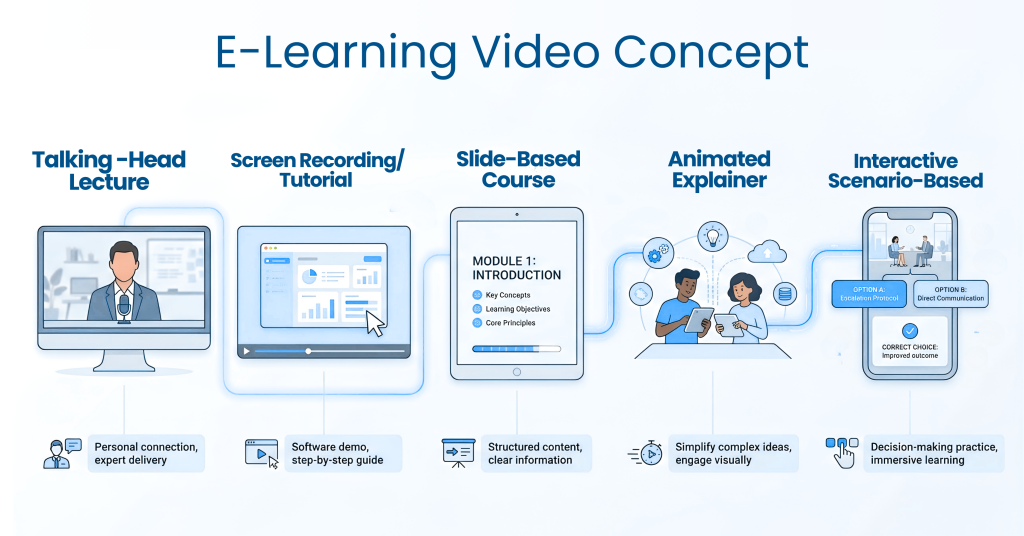
Talking-head lectures: The focus is on tight cuts and clean audio. Editors remove pauses and filler words, then add lower thirds and slide inserts so the viewer is not looking at one shot for too long.
Screen recordings and software tutorials: Dead time is the biggest problem here, such as loading screens and mouse wandering. Editors use zooms, cursor highlights, and callouts to show exactly where to click and speed up repetitive steps.
Slide-based courses: The key is syncing each slide change with the narration. Editors keep text readable, avoid clutter, and add simple animations to reveal points one at a time.
Animated explainers: These depend on scene pacing and voiceover sync. Reusable scene templates keep a long series consistent and help deliver large batches faster.
Interactive and scenario-based videos: Editors place cue points for quizzes, branching choices, or reflection questions. The video has to pause at the right moments so the interaction supports the lesson.
Key Elements of a Well-Edited Training Video
A well-edited training video is built from a few repeatable elements. Each one lowers the mental effort needed to follow the lesson. Together they make the course feel professional and consistent.
Clean audio: Remove background noise and balance voice levels before anything else.
Readable visuals: Use large fonts, high contrast and centered key elements, especially for mobile viewers.
Consistent branding: Keep the same intro, color palette and structure across every video.
Chapter markers: Let learners jump to the section they need.
Interactive cues: Add quizzes, polls, or clickable prompts at natural breaks in the lesson.
Technical Requirements: LMS, SCORM, and File Formats
E-learning videos must work in the platforms where learners are actually using them. Most organizations use a learning management system (LMS) to deliver training, so compatibility is just as important as visual quality. An editor should know the right export settings before delivery, not after delivery. Get this wrong and playback will break or videos won’t track learner progress.
The most popular export format is MP4 with the H.264 codec since it plays on almost every device. Compressing files without losing quality speeds up video loading on phones and slow connections. Some LMS platforms also require that content be packaged as SCORM for tracked training. Always check what format your client’s platform needs before you export.
Why Short, Focused Videos Work Better
There is no perfect length for an e-learning video, but short and focused is almost always better. Each video should be on one topic or one learning objective. Break down complicated subjects into short microlearning modules. This prevents learners from being overwhelmed and makes it easier to update a single lesson without having to redo an entire course.
Who Needs E-Learning Video Editing Services?
E-learning video editing services are useful for anyone who produces training or educational content regularly. Many of these teams have good subject knowledge but little time or video experience. A professional editor saves them hours and delivers a more polished result. Common clients include:
Corporate training and L&D teams
Online course creators and coaches
Universities and schools
SaaS companies creating onboarding or product training
HR teams building compliance and induction videos
Popular Tools for E-Learning Video Editing
Depends on the project, depends on the editor’s experience. The right tool. Camtasia and Descript are popular beginner-friendly tools for screen recordings and transcript-based editing. For multi-camera projects, complex color correction, and extensive audio cleanup, professionals often prefer Adobe Premiere Pro or DaVinci Resolve. Many editors use a mix of tools to meet the demands of each project.
How the E-Learning Video Editing Process Works
your own courses or hire a service, the steps are usually similar. Clear communication at the start prevents most delays later.
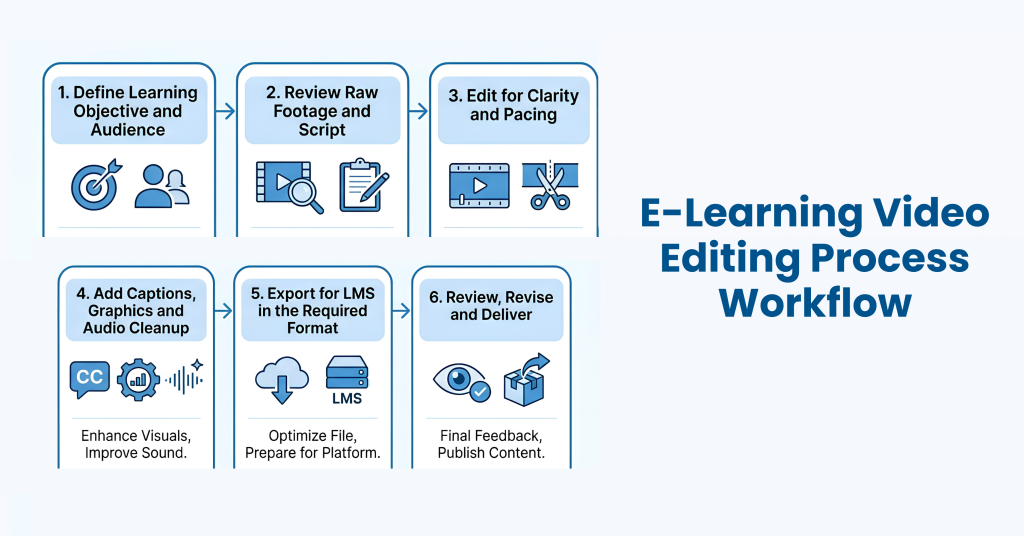
Define the learning objective and the target audience.
Review the raw footage and script to plan the structure.
Edit for clarity and pacing: cut filler, arrange segments, and add callouts.
Add captions, graphics, and audio cleanup.
Export for the LMS in the required format.
Review, revise, and deliver the final files.
How to Choose an E-Learning Video Editing Service
Not every video editor understands instructional design. Look for someone who has worked on training content before, not just promotional videos. Ask whether they handle captions, LMS exports and revisions as part of the service. A quick sample edit is often the best way to judge whether their style fits your learners.
Final Thoughts
E-learning video editing is not just about making videos look good. It is about making lessons easy to watch, understand, and remember. Clear audio, simple visuals, captions, and smooth editing help learners stay focused and follow each lesson without confusion.
What is e-learning video editing?
E-learning video editing is the process of editing training and educational videos so learners can understand and retain the material. It focuses on clarity, pacing, captions, accessibility, and LMS-ready output rather than entertainment.
How is e-learning video editing different from regular video editing?
Regular editing aims to entertain or promote, while e-learning editing aims to teach. It uses slower, more controlled pacing, on-screen text, captions, and formats that work inside learning platforms.Lorem ipsum dolor sit amet, consectetur adipiscing elit. Ut elit tellus, luctus nec ullamcorper mattis, pulvinar dapibus leo.
How long should an e-learning video be?
Do e-learning videos need captions?
Yes. Captions improve accessibility, help learners who watch without sound, and support compliance with accessibility standards like WCAG.
How much does e-learning video editing cost?
Pricing depends on video length, complexity, and extras like captions or animation. Most editors quote per finished minute or per project.