
Video editing styles are different ways to put a video together. They change how fast it moves, how clips are cut, and how text and sound are used. Common styles include cinematic, social media, corporate, montage, and documentary. The best style depends on your brand, audience, and goal. Picking the right one makes your videos clearer and stronger.
Two brands can film the same footage and end up with two very different videos. The difference is the edit. In this guide, you will learn the main types of video editing styles, what each one does best, and how to choose the one that fits your brand.
Why Your Video Editing Style Matters
Your editing style is the personality of your video. A slow, smooth edit feels calm and premium. A fast edit with bold text feels fun and full of energy. Viewers decide how they feel about your brand in the first few seconds, and the edit is a big part of that feeling.
The wrong style can hurt even a great video. A serious finance company with meme-style jump cuts may lose trust. A playful clothing brand with a stiff corporate edit may look boring. This is why video editing styles for brands should be chosen on purpose, not by accident.
The Main Types of Video Editing Styles
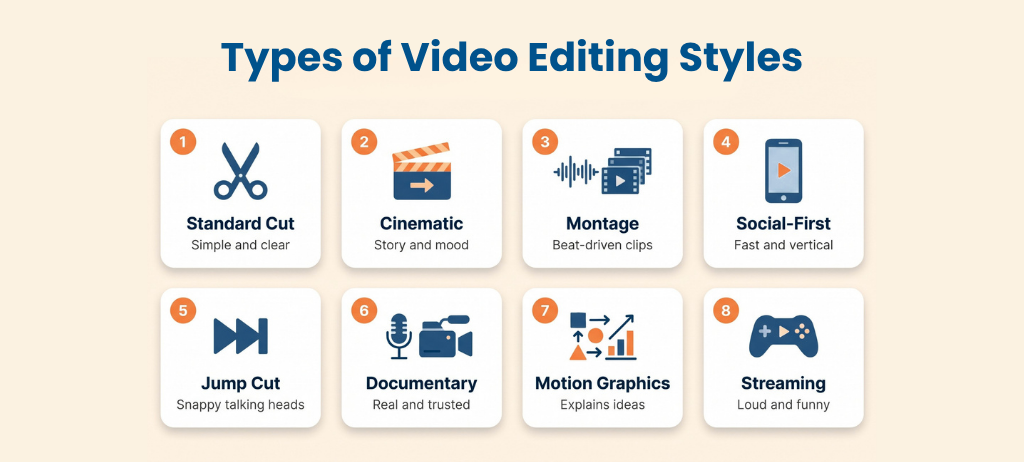
1. Standard Cut (Clean Editing)
Standard cut editing is simple and direct. Clips are joined with plain cuts and very few effects. The goal is clear communication, not decoration.
This style is best for corporate videos, interviews, training content, and vlogs. It works well when your message matters more than flashy visuals. Many B2B brands use this style because it feels honest and professional.
2. Cinematic Editing
Cinematic editing is built around story and emotion. It uses slower pacing, careful color grading, and strong music to create a mood. The viewer feels like they are watching a short film.
This style is best for brand films, high-end commercials, and launch videos. It takes more planning and more time to edit. In return, it makes a brand feel premium and memorable.
3. Montage Editing
A montage joins many short clips into one flowing sequence, usually set to music. It shows change, progress, or the passing of time. The beat of the music often decides when each cut happens.
Montage editing is best for fitness transformations, travel videos, event highlights, and brand stories. It can pack a lot of emotion into a short time. The key is to use clear beats so the video does not feel messy.
4. Short-Form and Social-First Editing
Social-first editing is made for phones and short attention spans. It uses fast pacing, vertical framing, bold animated captions, and a strong hook in the first few seconds. Many viewers watch without sound, so the text has to carry the message.
This style is best for TikTok, Instagram Reels, and YouTube Shorts. It is also a smart choice for brands that want to reach new people fast. One common mistake is posting a wide horizontal video on a vertical platform, which weakens the result.
5. Jump Cut Editing
Jump cuts remove pauses, mistakes, and filler words from a single shot. The result is a quick, snappy video where the speaker never wastes a second. It feels energetic and direct.
This style is best for talking-head videos, tutorials, and commentary. Coaches, advisors, and creators use it a lot. Used too much, it can feel tiring, so give viewers short breaks with B-roll or text.
6. Documentary-Style Editing
Documentary editing is built on real people and real stories. It mixes interviews, natural footage, and supporting clips called B-roll. The editor chooses moments that feel honest and builds a clear story from them.
This style is best for customer testimonials, case studies, and brand origin stories. It builds trust because it feels real. Over-scripted testimonials usually fail here, since viewers can tell when a story is staged.
7. Motion Graphics and Animation Editing
This style adds animated titles, icons, charts, and moving shapes to the video. It helps explain ideas that a camera cannot show, like data, software, or step-by-step processes. It is also easy to match to your brand colors and fonts.
Motion graphics are best for explainers, product promos, and tech videos. They work very well for B2B and SaaS brands. Keep the graphics simple, because too many effects can fight with your message.
8. Streaming and Gaming Editing
This style is built around the creator’s personality. It often uses a webcam in the corner, live chat on screen, meme inserts, and highlight moments. The energy is loud, fast, and funny.
It is best for Twitch content, Let’s Plays, and reaction videos. Most corporate brands will not use it fully. Still, small parts of it, like quick reaction cuts, can add fun to social content.
Editing Techniques That Shape Every Style
Every style is built from a few basic tools. Knowing them helps you talk to your editor and understand why a video feels the way it does.
Linear vs. Non-Linear Editing
Linear editing means arranging footage in order, one clip after another, as editors once did with tape. Non-linear editing lets you jump around and change any part of the video at any time. Almost all editing today is non-linear, using tools like Adobe Premiere Pro or DaVinci Resolve.
Continuity vs. Discontinuity Editing
Continuity editing keeps time, space, and action smooth so the viewer does not notice the cuts. Discontinuity editing breaks that flow on purpose, like a jump cut, to create energy or surprise. Corporate and documentary videos lean on continuity. Social and creative videos often use discontinuity.
Common Cuts and Transitions
- J-cut: The audio from the next scene starts before the picture changes.
- L-cut: The audio from the current scene continues after the picture changes.
- Cross-cut: The video switches back and forth between two actions happening at the same time.
- Match cut: One shot flows into the next because of a similar shape, motion, or idea.
- Fade and dissolve: A slow change from one scene to another or to a color.
How to Choose the Right Video Editing Style for Your Brand
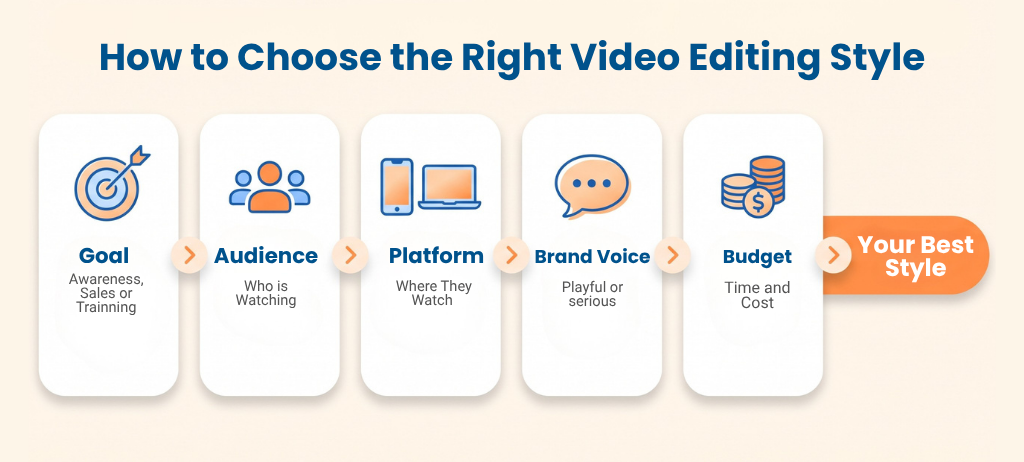
Choosing a style gets easier when you answer a few simple questions. Start with your goal, not with what looks cool.
- What is the goal? Awareness, sales, training, or trust? Each goal fits a different style.
- Who is your audience? Busy executives and teenage shoppers want very different videos.
- Where will people watch? Vertical social platforms need fast, captioned edits. A website or webinar can handle slower, deeper edits.
- What is your brand voice? Playful, serious, premium, or friendly? Your edit should sound like your brand.
- What are your time and budget? Cinematic and motion graphics take longer. Clean cuts and social edits are faster and cost less.
Pro tip: Watch three to five videos from brands in your space. Notice what feels right and what feels overused. Then pick a style that fits your brand but still stands out.
Best Video Editing Style by Brand Type
Brand type | Best-fit styles | Why it works |
B2B and SaaS | Clean cut, motion graphics, documentary | Clear, trustworthy, and easy to understand |
E-commerce and DTC | Social-first, montage, jump cut | Fast, fun, and built for scrolling |
Luxury and lifestyle | Cinematic, slow montage | Feels premium and emotional |
Education and training | Clean cut, motion graphics | Clear steps and simple visuals |
Coaches and advisors | Jump cut, talking head, testimonial | Personal, direct, and builds trust |
Fitness and sports | Montage, high-energy social edits | Shows energy and results |
Can You Mix Video Editing Styles?
Yes, and many strong brands do. A single campaign might start with an animated explainer, add a customer testimonial, and finish with short social clips. Each piece uses the style that fits its job.
The key is to stay consistent. Keep the same colors, fonts, music mood, and logo style across all videos. That way, your content feels like one brand even when the editing styles change.
Common Mistakes to Avoid
- Copying trends without a reason. A trend only helps if it fits your brand and audience.
- Using one video everywhere. A wide video cropped for Reels rarely performs well. Edit for each platform.
- Over-editing. Too many effects and transitions distract from the message.
- Ignoring sound. Poor audio makes viewers leave faster than weak visuals.
- Skipping captions. Many people watch with the sound off, and captions also help accessibility.
- Having no style guide. Without one, every video looks a little different.
Final Thoughts
There is no single best video editing style. The best one is the style that matches your brand voice, your audience, and your goal. Start by knowing what you want the video to do, then choose the edit that supports it.
Need help finding the right style? Our video editing services help brands turn raw footage into clear, on-brand videos. Contact us to talk about your next project.
Frequently Asked Questions
How many types of video editing styles are there?
There is no fixed number, because styles keep changing with new tools and platforms. Most guides list between five and ten main types. The most common are cinematic, social-first, corporate, montage, jump cut, and documentary.
What is the best video editing style for a business?
It depends on your goal and audience. Clean cut and motion graphics styles work well for B2B and training videos. Social-first and montage styles work well for consumer brands.
What is the difference between cinematic and corporate video editing?
Cinematic editing focuses on mood, story, and emotion. Corporate editing focuses on clarity, structure, and a clear message. Both can look professional, but they serve different goals.
What editing style works best for social media?
Short-form, social-first editing works best. It uses vertical framing, a strong hook, fast pacing, and bold captions. It is built for fast scrolling and silent viewing.
Can I use more than one editing style?
Yes. You can use different styles for different videos, as long as your branding stays consistent. Many brands mix explainers, testimonials, and social clips in one campaign.
Should I hire a professional video editor?
If video is a key part of your marketing, a professional editor saves time and gives you a consistent look. They can also recommend the right style for each goal. This is often worth it for brand films, training content, and ad campaigns.