
Short-form video editing focuses on speed, instant hooks, and one quick message, while long-form video editing builds a complete narrative with careful pacing and deeper context. The main differences are length, pacing, structure, captions, and the goal each video serves. The right choice depends on what you want viewers to do after watching.
This guide explains short-form video editing and long-form video editing side by side. It also shows how the two formats work in e-learning, where short microlearning clips and full course lessons often live in the same training program.
What Is Short-Form Video Editing?
Short-form video editing is the process of cutting videos built for quick viewing, usually from a few seconds up to about three minutes. These videos live on platforms like TikTok, Instagram Reels, and YouTube Shorts. The editor’s job is to grab attention immediately and keep it with fast cuts, dynamic text, and tight pacing. There is no room for slow setup.
What Is Long-Form Video Editing?
Long-form video editing is the process of shaping longer videos, from several minutes to an hour or more, into a clear and watchable story. Typical examples are YouTube videos, webinars, interviews, and full course lessons. The editor focuses on structure: a clear introduction, a developed middle, and a strong ending. Pacing is more relaxed, which gives viewers time to absorb context.
Where the line sits depends on who you ask. Some marketers draw it at 10 minutes, while platforms set their own limits. In practice, purpose matters more than the exact minute count.
Short-Form vs Long-Form Video Editing
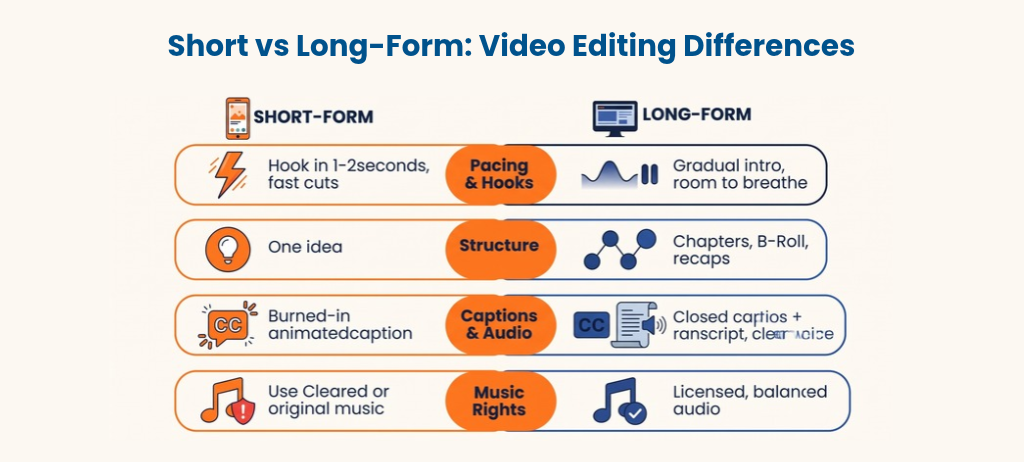
The two formats share the same tools, but almost every editing decision changes. The table below shows the main contrasts at a glance.
Aspect | Short-Form Video Editing | Long-Form Video Editing |
Typical length | Seconds to about 3 minutes | Several minutes to hours |
Opening | Hook in the first 1-3 seconds | Intro, context, then build-up |
Pacing | Fast, frequent cuts | Varied, with room to breathe |
Structure | One idea per video | Chapters and a clear arc |
Aspect ratio | Mostly vertical (9:16) | Mostly horizontal (16:9) |
Captions | Burned-in, often animated | Closed captions and transcripts |
Audio | Music and sound effects drive energy | Clear voice and balanced levels |
Best for | Awareness and quick tips | Depth, trust, and teaching |
How the Editing Approach Differs
Short-form and long-form videos may use the same editing software, but the way an editor works on them is very different. The main differences show up in four areas: pacing and hooks, structure, captions and audio, and music rights. Understanding each one helps you edit the right way for the format, instead of using one style for everything.
Pacing and hooks
Short-form editing needs a visual or audio hook in the first second or two, with no slow intro. Editors use fast cuts, animated text, and constant movement to stop viewers from scrolling away. Long-form editing is more patient. It uses a clear introduction, steady development, and moments of silence that let ideas land.
Structure
A short-form video carries one idea. A long-form video carries several, so the editor adds chapters, transitions, B-roll, and recaps to keep viewers oriented. Without that structure, a long video feels like a long recording instead of a designed experience.
Captions and audio
Short-form videos often use burned-in, animated captions because many viewers watch with the sound off. Long-form videos usually use closed captions plus a transcript, which also helps accessibility and search. Audio also differs: short-form relies on music and effects for energy, while long-form puts clear voice and balanced levels first.
Copyright and music
Music choices can affect reach more than most editors expect. YouTube states that a short video over one minute with an active Content ID claim is blocked globally. If you edit longer Shorts, use cleared or original music.
Short-Form vs Long-Form in E-Learning
In e-learning, the two formats do different jobs. Short-form videos work as microlearning: one concept, one skill, or one reminder in a few minutes. Long-form videos work as full lessons, walkthroughs, and recorded sessions where learners need depth and context. Most training programs need both.
Length matters for learning, too. A study of 6.9 million video-watching sessions on the edX platform found that shorter videos were much more engaging, and a summary of the study notes that engagement dropped sharply after about six minutes. The study covered online courses, so use it as a guide, not a rule.
The practical takeaway is to break long training content into short, focused segments with clear chapters. This is the core of training video editing: the format serves the learning goal, not the other way around. A good editor also makes sure both formats stay accessible, with captions and clean audio.
How to Keep a Long Form Video Training Series Consistent
Long form video training is rarely a single video. It is usually a series, such as a multi-module course or a full onboarding program. The challenge is keeping every video clear and consistent without rebuilding everything from scratch each time. These practices make that easier.
- Build reusable templates: Create a small set of scene or layout types, such as a title scene, a concept explanation, a step-by-step demo, and a recap. Reusing them keeps the series consistent and speeds up editing.
- Lock the audio first: Finalize the voiceover before detailed visual editing. Visuals, captions, and animation then sync to the final audio instead of changing later.
- Give every video the same arc: A short introduction, a developed middle, and a clear recap help learners know what to expect.
- Run a pilot first: Edit two or three sample videos and collect feedback before starting the full batch, so problems are fixed early.
- Keep a simple style guide: Write down fonts, colors, caption style, and audio levels so every video matches.
Pacing matters more as long-form videos get longer. Change the visuals every few seconds, add chapter markers, and leave short pauses after key points. This keeps viewers oriented without making the video feel rushed.
How to Choose Between Short-Form and Long-Form
Start with the outcome you want, not the format. The best length is however long it takes to reach your goal without wasting the viewer’s attention. Use these questions to decide:
- Goal: Awareness and quick reminders favor short-form. Teaching, trust, and detailed explanation favor long-form.
- Audience: Scrolling viewers want quick clips. Learners and buyers researching a decision will invest more time.
- Platform: Match the format to where the video will live, whether that is social feeds, an LMS, or a website.
- Resources: Short-form needs steady output. Long-form needs fewer videos but more planning and editing per piece.
How to Repurpose Long-Form Video Into Short Clips
Repurposing is the most efficient way to use both formats. One long video can supply weeks of short clips. The steps are simple.
- Pick the strongest moments: a key tip, a clear explanation, or a surprising point.
- Rebuild the opening: start on the most interesting line so the clip works without context.
- Reframe for vertical: crop or reposition to 9:16 and keep key visuals centered.
- Add captions and text: most viewers will watch without sound.
- Point back to the full video: end with a clear next step so short clips lead viewers to the full lesson.
Common Mistakes in Short-Form and Long-Form Editing
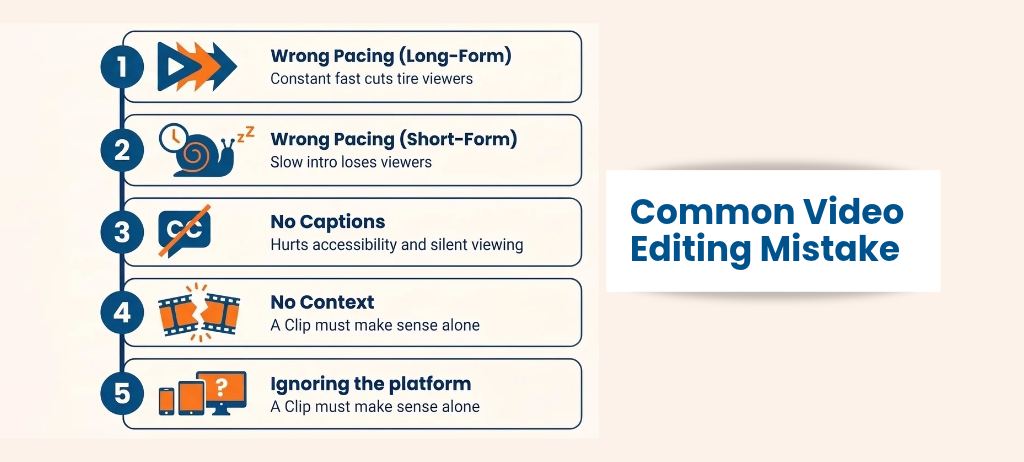
- Using short-form pacing on long-form content: constant fast cuts tire viewers over several minutes.
- Using long-form pacing on short-form content: a slow intro loses viewers before the point arrives.
- Skipping captions: this hurts accessibility and silent viewing.
- Cutting a clip without context: a repurposed clip must make sense on its own.
- Ignoring the platform: aspect ratio, length limits, and music rules vary across channels.
Best Tools for Short-Form and Long-Form Video Editing
The right editing tool depends on the format, the project size, and your experience. Many editors use different tools for short clips and long videos. Here is a simple way to choose.
For short-form video editing: Tools like CapCut are popular because they make vertical editing, auto captions, and quick effects easy. They suit fast turnaround work for TikTok, Instagram Reels, and YouTube Shorts. Templates and built-in text styles save time on repeated formats.
For long-form video editing: Adobe Premiere Pro and DaVinci Resolve are common choices for longer projects. They handle multi-track audio, chapters, color correction, and detailed timelines well. This control matters when a video runs for many minutes and has many segments.
For training and e-learning videos: Camtasia and Descript are popular for screen recordings, tutorials, and transcript-based editing. Editing by text makes it easy to remove filler words and tighten pacing. These tools are often used for course lessons and software walkthroughs.
Whatever tool you choose, check that it can export the format you need, such as vertical 9:16 for social platforms or MP4 for an LMS. A good workflow often combines two tools, one for the rough edit and one for final polish. The best tool is the one that fits your format, your skill level, and your deadline.
Final Thoughts
Short-form and long-form video editing are two different crafts built for two different jobs. Short-form earns attention, and long-form earns understanding. In e-learning and corporate training, the strongest programs use both: short clips to introduce and reinforce and longer lessons to teach in depth.
Frequently Asked Questions
What is the difference between short-form and long-form video editing?
Short-form editing focuses on speed, hooks, and one quick message, usually in videos up to a few minutes. Long-form editing builds a complete narrative with structure, pacing, and context over longer runtimes.
How long is a short-form video?
Short-form videos typically run from a few seconds to about three minutes. YouTube Shorts and Instagram Reels both allow up to three minutes, though platform rules can change.
Is short-form or long-form video better?
Neither is better in every case. Short-form is stronger for reach and quick messages, while long-form is stronger for teaching, trust, and detailed explanation. Many strategies use both.
Which is better for e-learning: short-form or long-form?
Both have a role. Short microlearning clips work well for single concepts and reminders, while longer lessons suit complex topics. Research on edX videos found engagement dropped sharply after about six minutes, so focused segments usually work best.
Can you turn a long video into short clips?
Yes. Pick the strongest moments, rebuild the opening so each clip stands alone, reframe to vertical, add captions, and link back to the full video.